
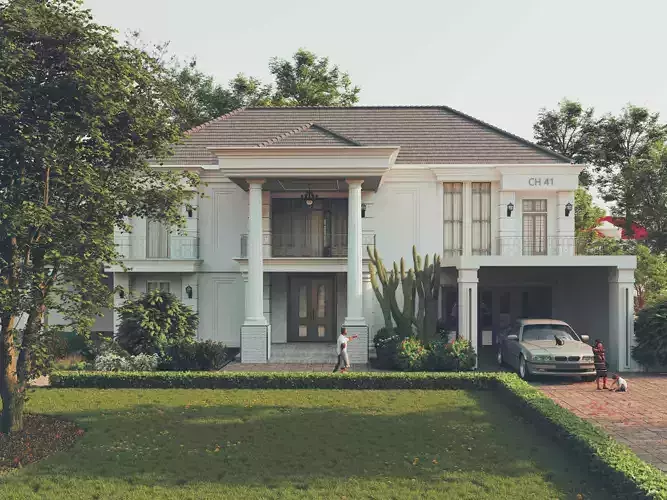
CH 41 VILLA SKETCHUP VRAY RENDER REFERENCE FILE 3D model
This is the full CH 41 file. You can download it and use it as a reference file. I used Sketchup 2024 version 24.0.553 and Chaos Vray for Sketchup version 7.0.. ..please use this as a reference file to learn and improve your Vray for Sketchup rendering skills. Take time and note the following: All textures and plants used are from Chaos Cosmos and available free from Chaos Casmos Library... look at how I arranged my scene. Take note of important things like field of view and camera arrangement. Take note and explore the textures.. some textures have raytracing properties, bump settings, and displacements turned on.. check for the textures settings and see each texture settings. Take note of the render elements used.. this is important in post-production Look at the frame buffer and explore the layers.. try turning on and off each layer to see its effect. check the layer tree and see which render elements were edited. look at the geometry tab and explore each geometry. Remember.. keep practicing and don't stop. I USED A LAPTOP HX D14VMSI CROSSHAIR CPU I7 14700 HXRTX 4070RAM 32GB2TD SSDThis is the full CH 42 file. You can download it and use it as a reference file. I used Sketchup 2024 version 24.0.553 and Chaos Vray for Sketchup version 7.0.. ..please use this as a reference file to learn and improve your Vray for Sketchup rendering skills. Take time and note the following: All textures and plants used are from Chaos Cosmos and available free from Chaos Casmos Library... look at how I arranged my scene. Take note of important things like field of view and camera arrangement. Take note and explore the textures.. some textures have raytracing properties, bump settings, and displacements turned on.. check for the textures settings and see each texture settings. Take note of the render elements used.. this is important in post-production Look at the frame buffer and explore the layers.. try turning on and off each layer to see its effect. check the layer tree and see which render elements were edited. look at the geometry tab and explore each geometry. Remember.. keep practicing and don't stop. I USED A LAPTOP HX D14VMSI CROSSHAIR CPU I7 14700 HXRTX 4070RAM 32GB2TD SSD
Digital Delivery
This is a digital product. No physical item will be manufactured, packaged, or shipped. Once your payment is confirmed, your files will be available to download.
A download link is emailed to you right after checkout, and the same files stay available from your order confirmation page — no waiting on the mail.
Before You Buy
- Exact file formats and what's included are listed in the product description above — check it matches the software or hardware you plan to use.
- Preview images illustrate the design; on-screen colors and final output can vary slightly depending on your device and software settings.
- Digital files are non-refundable once downloaded, since a download can't be "returned" the way a physical item can — see our Return Policy for details.
Usage Rights
Purchased files are for your own use under the license tier selected at checkout — they may not be resold, redistributed, or re-uploaded as a standalone digital product. Full terms are in our Terms of Service.
Customer Reviews
No reviews yet. Be the first to share your experience!